
Try CrateDB Live: More Queries
- 1. Choose Scenario
- 2. Get Ready
- 3. Run CrateDB
- 4. Import Data
- 5. Explore Queries
- 6. More Queries
- 7. Connect
- 8. Next Steps
B. Geospatial Queries
B1. How to extract latitude & longitude from a GEO_POINT
You can use the latitude and longitude functions to return the co-ordinates in a GEO_POINT datatype. This example will return the bounding box for all loaded data:
SELECT
  min(longitude(geo_location)) AS min_longitude,
  max(longitude(geo_location)) AS max_longitude,
  min(latitude(geo_location)) AS min_latitude,
  max(latitude(geo_location)) AS max_latitude
FROM
  demo.climate_data;
Let’s use the result of this to work out how many data points there are in a subset of the data, take this query and fill in some correct values based on the result of the above query.
SELECT COUNT(*) AS points
FROM demo.climate_data
WHERE data['latitude'] BETWEEN 47.40 AND 54.29
  AND data['longitude'] BETWEEN 6.08 AND 14.99;
If you get it right, this should return a non-zero count. If it’s zero, check your query and try again. More information on CrateDB’s geospatial capabilities is detailed here.
A more powerful way of doing this is to use the WITHIN function. This allows us to find points that lie within a polygon, which gives us the flexibility to use shapes other than a rectangle. The SQL below returns the latest temperatures from Bavaria, converted from Kelvin:
SELECT
  d.measurement_time as time,
  latitude(d.geo_location) as latitude,
  longitude(d.geo_location) as longitude,
  data['temperature'] -273.15 as temperature,
  gp.nearest_town
FROM
     demo.climate_data d
    ,demo.german_regions r
    ,demo.geo_points gp
WHERE WITHIN(d.geo_location, r.geo_coords)
AND gp.geo_location = d.geo_location
AND r.region_name = 'Bayern'
AND  d.measurement_time = (SELECT max(d2.measurement_time) FROM demo.climate_data d2);
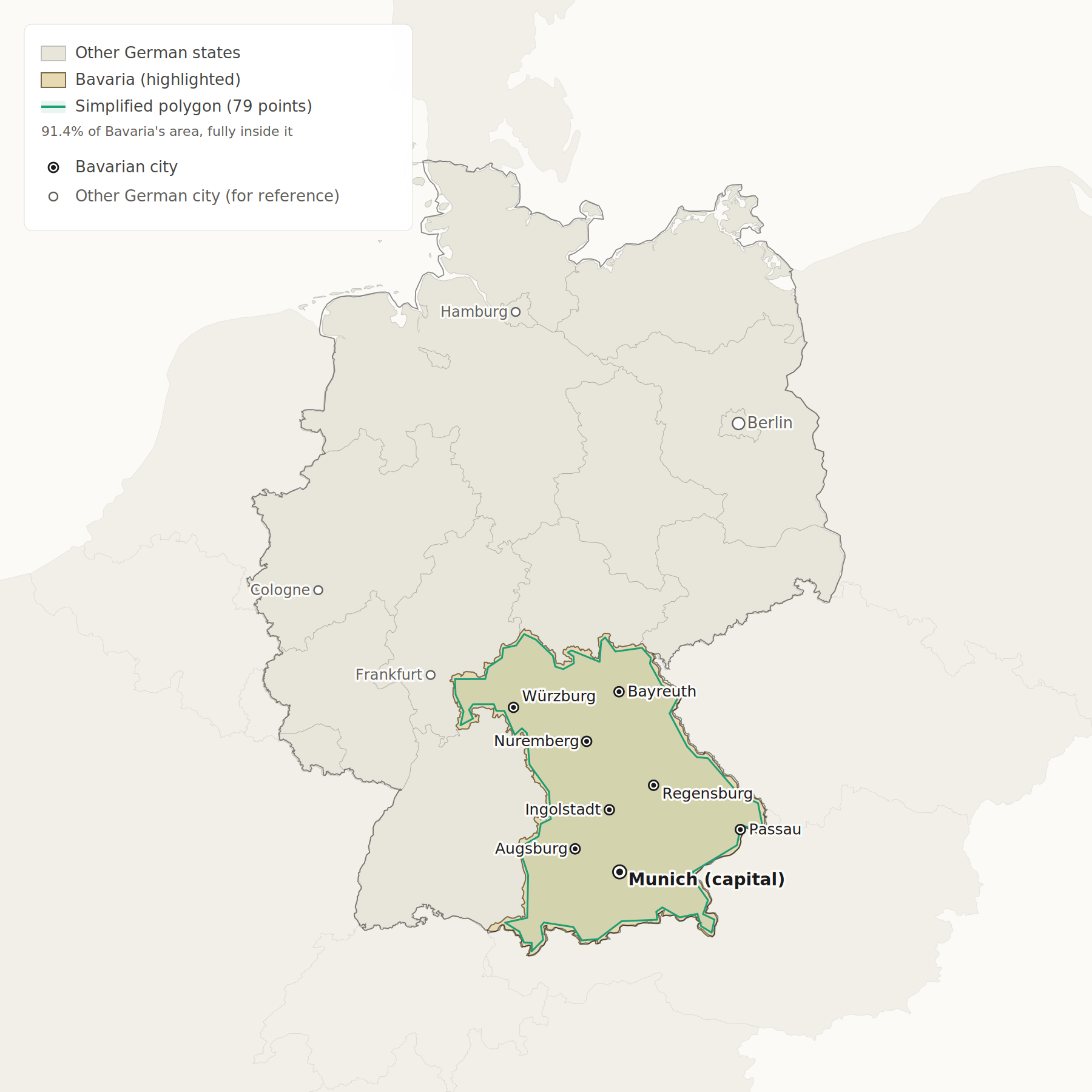
The list of points lives in a GEO_SHAPE column called geo_coords in the german_regions table, and is made of latitude/longitude pairs that form the boundary:
longitude1 latitude1, longitude2 latitude2, longitude3 latitude3 ...
If you draw these on a map they will effectively define the shape of the Bavaria region.
Note also that we did a three table join above.
B2. Distance calculations:
CrateDB also supports distance calculations, the following query gives the nearest points to Berlin, Germany (approximate location is 52.5N, 13.4E)
SELECT
  geo_location,
  distance(geo_location, 'POINT(13.4 52.5)') AS metres,
  min(data['temperature']) -273.15 AS min_temp,
  max(data['temperature']) -273.15 AS max_temp
FROM demo.climate_data
GROUP BY geo_location, metres
ORDER BY metres ASC
LIMIT 50;
C. Full text search Queries – access Apache Lucene using SQL
CrateDB uses Apache's Lucene to provide full text search functionality. In the german_regions table we have a column called economics, which contains a 2000 word summary for the economy of each region.
In the query below, we ask it to return the three regions that have the highest score for 'cars':
SELECT region_name, _score
FROM demo.german_regions
WHERE MATCH(economics, 'cars')
ORDER By _score DESC limit 3;
region_name      _score
Thüringen        0.9552864
Niedersachsen    0.5259006
Hessen           0.38886413
What's interesting here is that the same database is doing normal RDBMS, GeoSpatial stuff and full text search.
D. Vector Search
CrateDB supports semantic ("vector") search natively via the FLOAT_VECTOR datatype and the KNN_MATCH operator. Unlike full text search, which matches on words, vector search matches on meaning. Two phrases with no words in common can still score highly if they describe the same concept.
In our demo.german_regions table the embedding column is declared as FLOAT_VECTOR(1536). Each row's embedding is a 1536-dimensional vector generated by OpenAI's text-embedding-3-small model, summarising the four text fields (tourism_info, transportation, economics, introduced_species) for that region.
To search this column you need a small Python helper: cratedb_knn_search.py, and a requirements.txt. Download them and save it next to your .env.
Then install the required packages:
pip install -r requirements.txt
The script needs an OpenAI API key. The reason is that KNN_MATCH compares vectors, not strings — so before the script can ask CrateDB "which region is closest to wine country?", it has to convert the phrase wine country into a 1536-dim vector using the same OpenAI model that produced the embeddings in the table. The key is used once per query, from your laptop, to call api.openai.com/v1/embeddings; it is never sent to CrateDB.
Set the key and run:
export OPENAI_API_KEY=sk-...
echo "wine country" | python cratedb_knn_search.py \
  --host localhost --database demo
Region                          Score
------------------------------  -----
#1  Bayern                        0.4088
#2  Rheinland-Pfalz               0.3928
#3  Baden-Württemberg             0.3819
#4  Saarland                      0.3800
#5  Hessen                        0.3731
Notice that the word "wine" appears nowhere in any region's name — the model ranked Rheinland-Pfalz and Baden-Württemberg (Germany's two largest wine-growing states) at the top purely on the meaning of the surrounding text. That's the difference between full text and vector search: the former needs the word; the latter needs only the idea.
E. Queries – JSON object model
E1. Insert a new value into the dataset:
INSERT INTO demo.climate_data (measurement_time, geo_location, data) VALUES (123, [8.78831111111111, 54.903], {"longitude" = 8.78831111111111, "latitude" = 54.903, "temperature" = 16.868310546875023, "u10" = 4.472952365875244, "v10" = -1.3958832025527954, "pressure" = 102426.1015625});
This is using the existing schema. What if we want to add a new 'humidity' field to our dataset, do we need to recreate the table?
In CrateDB we can define object columns (i.e. JSON) as one of three different types:
OBJECT(STRICT)– The schema for the object is fixedOBJECT(DYNAMIC)– The schema is dynamic, and new attributes can be addedOBJECT(IGNORED)– The JSON is stored ignoring the datatypes of the attributes and not indexing the field
See this page for more detailed information.
When you created this table, you set the data column to be DYNAMIC, so we can add additional attributes easily, and these attributes will be indexed.
Add a new key in the JSON object without the need to modify the schema.
INSERT INTO demo.climate_data (measurement_time, geo_location, data) VALUES (123, [8.78831111111111, 54.903], {"humidity" = 43.4, "longitude" = 8.78831111111111, "latitude" = 54.903, "temperature" = 16.868310546875023, "u10" = 4.472952365875244, "v10" = -1.3958832025527954, "pressure" = 102426.1015625});
E2. Now try to query the new key:
SELECT
  data['humidity']
FROM
  demo.climate_data
WHERE
  data['humidity'] IS NOT NULL;
This makes it very easy to extend the data model, ideal for IoT applications where additional sensor information may become available.
And of course, with CrateDB all of this additional data will be indexed for great query performance.