CrateDB's Dynamic Objects Avoid Outages, Downtime, and Human Intervention, Saving Time and Money
Very few large production systems exist without change. In every real-world database system the author has seen, implementing and managing change is not just a ‘fact of life’, it’s the main activity. You’d never know this from reading Medium posts, or articles on LinkedIn, which generally focus on the ‘new and shiny’, but once a system is up and running, and has upstream and downstream customers, an apparently simple change can start a chain reaction of work that can tie up an entire team for days. Google’s stats show that 70% of outages result from a change. Bear in mind it’s not enough to devise a ‘method of procedure’, a cookbook for how to do the change. You also must test it, which implies you have a test environment with up-to-date data, and it needs to be large enough to reveal any issues.
One of the more interesting design features of CrateDB is how it can act like a document database when it wants to. Specifically, it’s possible to set up a CrateDB table so that if it’s asked to insert a column it’s never seen before, it adds it at runtime.
Let’s walk through an example of this.
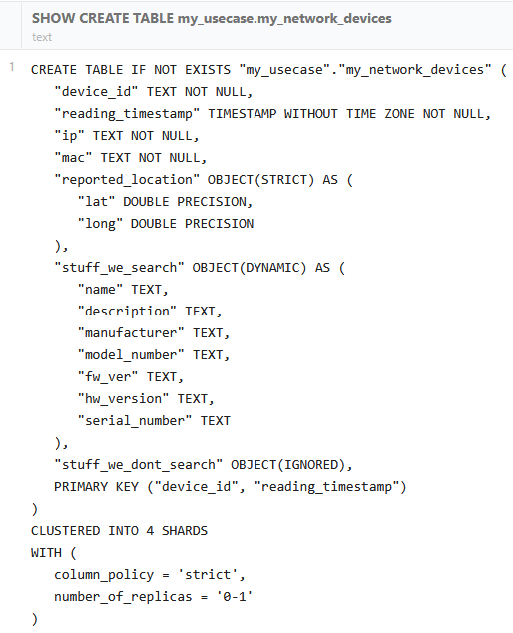
In the table above, we define three ‘objects’, each of which has one of three policies supported by CrateDB:
STRICT means that the object has a fixed number of attributes with fixed types. All possible attribute keys must be pre-declared. Unknown keys are rejected. All values are indexed. In this case, we are storing latitude and longitude.
DYNAMIC is the default, and where things get interesting. New inner keys are accepted, and each one is added to the schema and indexed on first sight. The first value seen is used to infer a data type, and subsequent values will be cast to that data type. All values are indexed.
IGNORED doesn’t actually mean we ‘ignore’ the data. It means we have no idea what kind of data we’re going to get. We won’t make assumptions about data types. We store everything we get, but don’t enforce a schema and don’t index the values.
What does this mean in practice? As a developer, I generally don’t need to know every possible low-level data item for every possible device we might see. For people in the IoT IoT space, this is a blessing! A lot of devices just love producing streams of stats and data points that are obscure and may appear or disappear every time there is a firmware update. Here’s a sample of the kind of data we’re talking about, ‘radio stats’ for a router:
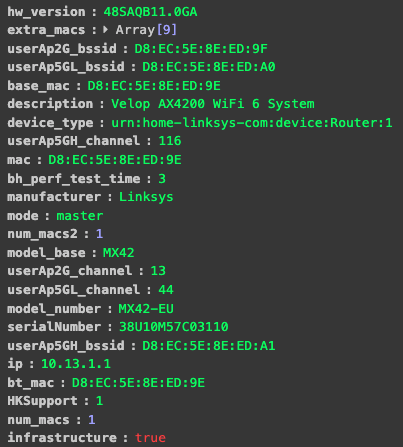
As a DBA, I have no clue what half of this is. I just know we need to store it. I can say that if I load data from a different model of router, or a router with different firmware, I will get a slightly different set of stats. If we just need to store this in CrateDB, we can use OBJECT(IGNORED). If we need to index specific columns so we can query them efficiently in SQL, we can use OBJECT(DYNAMIC).
In our GitHub repository, we have a small example of this that you can use in standalone CrateDB or CrateDB Cloud. Having created the table above, we insert a row, and then see what the table structure looks like:
But wait! Haven’t we changed the schema by inserting into it? Yes, we have:
Note that the schema change is only reported for the DYNAMIC column. The IGNORED column still has data, but it doesn’t show up in the schema. It’s searchable, but you may need to cast search terms.
Conclusion
So what does this mean, and why does it matter? New columns show up all the time in live systems. In a traditional RDBMS, this means an ALTER TABLE statement, which sets off a whole chain of tasks and may lead to either downtime or a scenario where the backup system has a different schema to the live system, which is problematic. In CrateDB there is no need for human intervention at all.
Do you want to try it on your own use case?