

Contents Menu Expand Light mode Dark mode Skip to content
  • Product
    • Editions
      • CrateDB Cloud
      • CrateDB Enterprise
      • CrateDB OSS
    • Features
      • Overview
      • High cardinality
      • SQL syntax
      • Integrations
      • Security
    • Data models
      • Time-series
      • Document/JSON
      • Vector
      • Full-text
      • Spatial
      • Relational
  • Solutions
    • By use cases | Real-time
      • Industrial Analytics
      • AI operations
      • Application analytics
    • By industry
      • Manufacturing
      • Energy
      • FMCG
      • Logistics
      • Oil, Gas & Mining
      • Transportation
      • SaaS
      • Media & Entertainment
  • Resources
    • Customer stories
    • Academy
    • Asset library
    • Blog
    • Events
  • Developer
    • Documentation
    • Drivers and tools
    • Community
    • GitHub
    • Support
  • Pricing
  • Login
  • Get Started
    • Overview
      • Solutions and use cases
        • Time series data
          • Fundamentals
            • Generate time series data
              • Generate time series data from the command line
              • Generate time series data using Python
              • Generate time series data using Node.js
              • Generate time series data using Go
            • Normalize time series data intervals
            • Analyzing weather data
            • Analyzing device readings with metadata integration
          • Advanced analysis
          • Video tutorials
        • Industrial big data
          • Azure IoT
          • Machine Learning
          • ABB insights
          • Rauch insights
          • SPGo! insights
          • TGW insights
        • Long-term store
          • Automatic retention and expiration
        • Real-time raw-data analytics
          • Bitmovin insights
        • Machine learning
    • Getting Started
      • Video learning
      • Data modelling
        • Relational data
        • JSON data
        • Time series data
        • Geospatial data
        • Full-text data
        • Vector data
        • Primary key strategies
      • Query capabilities
        • Aggregations
        • Ad-hoc queries
        • Search
        • AI integration
        • Performance
      • Import data
      • Sample applications

    Build

    • Load data into CrateDB
      • Load and Export (ETL)
      • Change Data Capture (CDC)
      • Metrics, telemetry, and logs
    • Connect / Drivers
      • General information
      • Applications
      • Software Testing
      • C#
      • Elixir
      • Erlang
        • Erlang ODBC
        • Erlang epgsql
      • F#
      • Go
        • pgx
        • pq
        • KSQL
      • Groovy
      • Java
        • PostgreSQL JDBC
        • CrateDB JDBC
        • Hibernate / JPA
        • jOOQ
        • Software testing
      • JavaScript
        • node-postgres
        • node-crate
      • Julia
      • Kotlin
      • Perl
      • PHP
        • AMPHP PostgreSQL
        • PostgreSQL PDO
        • CrateDB PDO
        • CrateDB DBAL
      • Python
        • crate-python
        • sqlalchemy-cratedb
        • Conecta
        • cratedb-async
        • micropython-cratedb
        • psycopg2
        • psycopg3
        • aiopg
        • asyncpg
        • ConnectorX
        • Records
        • turbodbc
      • R
      • Ruby
      • Rust
      • Scala
      • ODBC
        • C#
        • Erlang
        • Python
        • Visual Basic
      • Visual Basic
      • Zig
      • Natural language
    • Integrations
      • Categories
        • Business Intelligence
        • Data Lineage
        • Data Visualization
        • Programming Frameworks
        • Migrations
          • Rockset
            • Migrate Queries
      • Airflow / Astronomer
        • Getting started
        • Import Parquet files
        • Import stock market data
        • Export to S3
        • Data retention policy
        • Hot/cold data retention
      • AMQP
        • Usage
      • Arrow
        • Import Parquet files
      • Atlan
      • AWS Lambda
      • Azure Functions
        • Tutorial
      • Balena
        • Usage
      • Cluvio
        • Usage
      • collectd
        • Usage with collectd
        • Usage with Telegraf
      • Conecta
      • Coreflux
        • Usage
      • Dapr
        • Usage
      • Dask
        • Usage
      • Databricks
        • Azure Databricks
      • DataGrip
      • Datashader
      • DBeaver
      • dbt
        • Usage
      • Debezium
        • Tutorial
      • Django
        • Settings
        • Models
        • Fields
        • Scalar functions
      • dlt
        • Usage
      • DMS (AWS Database Migration Service)
      • DynamoDB
      • Estuary
      • Explo
      • Flink
      • Gradio
      • Grafana
        • Tutorial
      • HiveMQ
        • Usage
      • Hop
      • Iceberg
      • InfluxDB
        • Usage
        • Cloud to Cloud
        • Data Model
      • ingestr
      • JMeter
      • Kafka
        • Using Kafka with Python
        • Using Confluent Kafka Connect
      • Kestra
        • Usage
      • Kinesis
      • LangChain
        • Usage
      • LlamaIndex
        • Text-to-SQL synopsis
        • Text-to-SQL usage
      • Locust
        • Tutorial
      • Marquez
        • Usage
      • Model Context Protocol (MCP)
        • CrateDB MCP Server
        • Community servers
      • Meltano
      • Metabase
        • Usage
      • MindsDB
      • MLflow
      • MongoDB
        • Usage
        • Cloud to Cloud
        • MongoDB’s data model
      • Mosquitto
        • Usage
      • MQTT
      • MySQL and MariaDB
        • Usage
        • Use CSV
      • n8n
      • NiFi
        • Usage
      • Node-RED
        • Tutorial
      • OpenTelemetry
        • Collector Usage
        • Telegraf Usage
      • Oracle
        • Usage
      • pandas
        • Starter tutorial
        • Jupyter tutorial
        • Efficient ingest
      • Plotly and Dash
      • Polars
      • PostgreSQL
        • Usage
      • Power BI
        • Power BI Desktop
        • Power BI Service
      • Prefect
        • Usage
      • Prometheus
        • Usage
      • PyCaret
      • PyViz
      • QueryZen
      • R
        • Tutorial
      • Rill
        • Usage
      • RisingWave
        • Stream processing from Iceberg tables to CrateDB using RisingWave
      • rsyslog
        • Usage
      • scikit-learn
      • Spark
        • Usage
      • SQL Server
      • StatsD
        • Usage
      • Streamlit
      • StreamSets
        • Usage
      • Superset / Preset
        • Usage
        • Sandbox
      • Tableau
      • Telegraf
        • Usage
      • TensorFlow
        • Tutorial
      • Terraform
        • Usage
      • Trino
        • Usage
    • All Features
      • Highlights
      • SQL
      • Document Store
        • Tutorial
      • Relational / JOINs
      • Search: FTS, Geo, Vector, Hybrid
        • Full-Text Search
          • Full-text Search Options
          • Analyzers, Tokenizers, and Filters
          • Tutorial
          • Indexing Text for Both Effective Search and Accurate Analysis
        • Geospatial Search
        • Vector Search
        • Hybrid Search
      • BLOB Store
      • Clustering
      • Snapshots
      • Cloud Native
      • Storage Layer
        • Indexing and storage in CrateDB
      • Hybrid Index
      • Advanced Querying
        • Recurrent queries
      • Generated Columns
      • Server-Side Cursors
      • Foreign data wrappers
      • User-Defined Functions
      • Cross-Cluster Replication
        • Usage

    Operations

    • Installation
      • Debian, Ubuntu
      • Red Hat, SUSE
      • Windows
      • Tarball
      • Container setup
        • Docker
        • Kubernetes
          • CrateDB and Kubernetes
          • Run CrateDB with Kubernetes Operator
      • Cloud hosting
        • Amazon AWS
          • CrateDB on Amazon EC2
          • Deploy using Terraform
          • Using Amazon S3 as a snapshot repository
        • Microsoft Azure
          • CrateDB on Azure VMs
          • Deploy using Terraform
      • Configuration settings
      • Multi-node setup
      • Multi-zone setup
    • Administration
      • Bootstrap checks
      • User management
      • Going into production
      • Monitoring and diagnostics
        • Prometheus and Grafana
        • Prometheus JMX Exporter
        • Prometheus SQL Exporter
      • Memory configuration
      • Circuit breaker
      • Troubleshooting
        • System Tables
        • CrateDB Flight Recorder (CFR)
        • Java Flight Recorder (JFR)
        • The jcmd Utility
          • Using jcmd with CrateDB on Docker
          • Java Flight Recorder (JFR)
        • The crate-node command
      • Scaling
        • Expand
        • On-Demand
        • Autoscale
        • On Kubernetes
      • Upgrading
        • Guidelines
        • Rolling Upgrade
        • Full Restart Upgrade
    • Performance guides
      • Sharding and partitioning 101
      • Sharding recommendations
      • Scaling
      • Storage
      • Fast Inserts
        • Insert Methods
        • Bulk Inserts
        • Parallel Inserts
        • Configuration Tuning for Inserts
        • Testing Insert Performance
      • Fast Selects
      • Query Optimization 101

    References

  • CrateDB Cloud
    • CrateDB
      • Tools

      • Admin UI
        • CrateDB CLI
          • Cloud CLI
            • CrateDB MCP
            • CrateDB Toolkit
            • Support
            • Community

            Flink

            Apache Flink logo
            CI status: Apache Kafka, Apache Flink

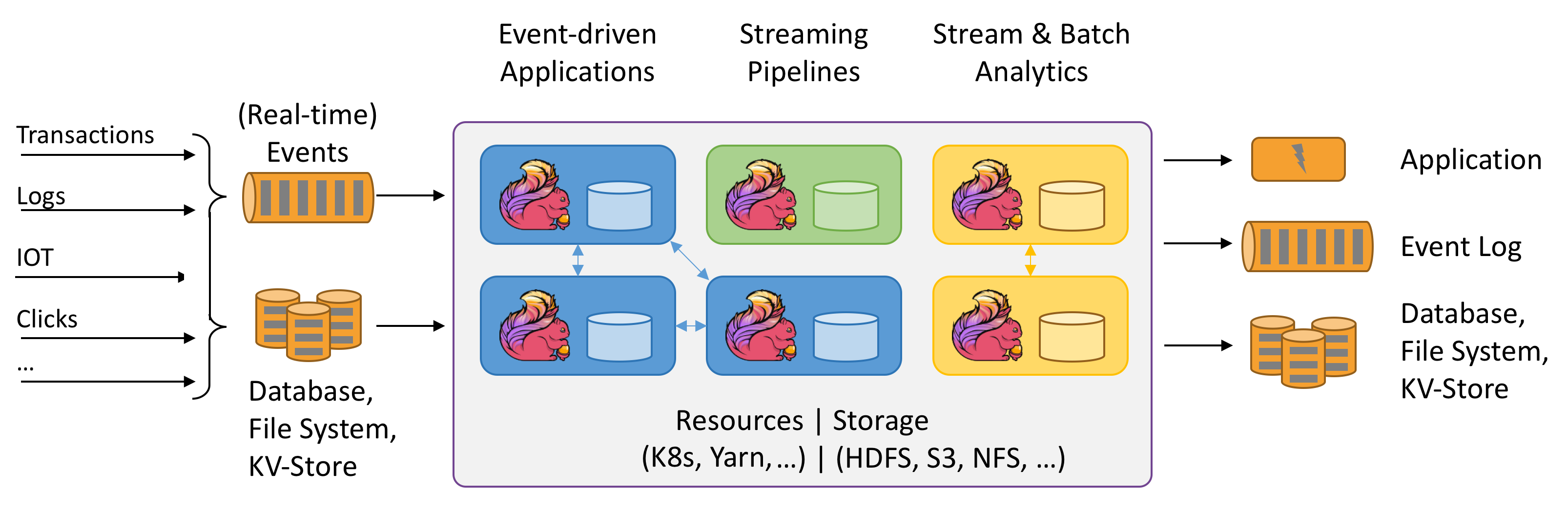
            Apache Flink is a programming framework and distributed processing engine for stateful computations over unbounded and bounded data streams, written in Java. It is a battle-hardened stream processor widely used for demanding real-time applications.

            Details

            Flink has been designed to run in all common cluster environments, perform computations at in-memory speed and at any scale. It received the 2023 SIGMOD Systems Award.

            Apache Flink greatly expanded the use of stream data-processing. Data Pipelines Done Right.
            Managed Flink

            A few companies are specializing in offering managed Flink services.

            • Aiven offers their managed Aiven for Apache Flink solution.

            • Immerok Cloud’s offering is being converged into Flink managed by Confluent, see Confluent Streaming Data Pipelines.

            Connect

            Flink’s JdbcSink is a streaming connector that writes data to a JDBC database, for example using the [PostgreSQL JDBC Driver] that also works with CrateDB. When configuring the data sink, use:

            url:

            jdbc:postgresql://localhost:5432/crate

            driver:

            org.postgresql.Driver

            Synopsis

            from pyflink.common import Types
            from pyflink.datastream.connectors.jdbc import JdbcConnectionOptions, JdbcExecutionOptions, JdbcSink
            
            JdbcSink.sink(
                "INSERT INTO doc.weather_flink_sink (location, current) VALUES (?, ?)",
                Types.ROW_NAMED(["location", "current"], [Types.STRING(), Types.STRING()]),
                JdbcConnectionOptions.JdbcConnectionOptionsBuilder()
                .with_url("jdbc:postgresql://localhost:5432/crate")
                .with_driver_name("org.postgresql.Driver")
                .with_user_name("crate")
                .with_password("")
                .build())
            
            More Examples
            import org.apache.flink.connector.jdbc.JdbcConnectionOptions;
            import org.apache.flink.connector.jdbc.JdbcExecutionOptions;
            import org.apache.flink.connector.jdbc.JdbcSink;
            
            JdbcSink.sink(
                "INSERT INTO my_schema.books (id, title, authors, year) VALUES (?, ?, ?, ?)",
                (statement, book) -> {
                    statement.setLong(1, book.id);
                    statement.setString(2, book.title);
                    statement.setString(3, book.authors);
                    statement.setInt(4, book.year);
                },
                JdbcExecutionOptions.builder()
                    .withBatchSize(1000)
                    .withBatchIntervalMs(200)
                    .withMaxRetries(5)
                    .build(),
                new JdbcConnectionOptions.JdbcConnectionOptionsBuilder()
                    .withUrl("jdbc:postgresql://localhost:5432/crate")
                    .withDriverName("org.postgresql.Driver")
                    .withUsername("crate")
                    .withPassword("")
                    .build()
            ));
            
            from pyflink.common import Types
            from pyflink.datastream.connectors.jdbc import JdbcConnectionOptions, JdbcExecutionOptions, JdbcSink
            
            JdbcSink.sink(
                "INSERT INTO doc.weather_flink_sink (location, current) VALUES (?, ?)",
                Types.ROW_NAMED(["location", "current"], [Types.STRING(), Types.STRING()]),
                JdbcConnectionOptions.JdbcConnectionOptionsBuilder()
                .with_url("jdbc:postgresql://localhost:5432/crate")
                .with_driver_name("org.postgresql.Driver")
                .with_user_name("crate")
                .with_password("")
                .build(),
                JdbcExecutionOptions.builder()
                .with_batch_interval_ms(1000)
                .with_batch_size(200)
                .with_max_retries(5)
                .build()
            )
            

            Learn

            Guides

            Build a data ingestion pipeline

            Learn how to build a data ingestion pipeline using three open-source tools: Apache Kafka, Flink, and CrateDB.

            Example: Kafka receives telemetry messages from IoT sensors and devices. Flink consumes the data stream and stores it into CrateDB. All tools are distributed systems that provide elastic scaling, fault tolerance, high-throughput, and low-latency performance via parallel processing.

            https://dev.to/crate/build-a-data-ingestion-pipeline-using-kafka-flink-and-cratedb-1h5o
            Source: Executable Stack (Java)

            An executable stack with Apache Kafka, Apache Flink, and CrateDB. Uses Java.

            https://github.com/crate/cratedb-examples/tree/main/framework/flink/kafka-jdbcsink-java
            Source: Executable Stack (Python)

            An executable stack with Apache Kafka, Apache Flink, and CrateDB. Uses Python.

            https://github.com/crate/cratedb-examples/tree/main/framework/flink/kafka-jdbcsink-python

            Webinars

            Apache Flink 101

            Why Flink is interesting for building real-time streaming applications, and how it works.

            Flink’s performance and robustness are the results of a handful of core design principles, including a shared-nothing architecture with local state, event-time processing, and state snapshots (for recovery). This course introduces you to these core concepts.


            Webinar Fundamentals

            CrateDB Community Day: Maximizing your data potential with CrateDB integrations

            Flink connects different messaging systems, file systems, and database key/value stores for multiple purposes. For data integrations, it can serve as a data hub between systems and much more like event-driven applications, and it’s very flexible.

            The webinar includes a live demo of Apache Flink with CrateDB as source or sink.

            • CrateDB Community Day 2nd Edition: Summary and Highlights

            • Community Day: Stream processing with Apache Flink and CrateDB


            Webinar Integrations

            Next
            Gradio
            Previous
            Explo
              Feedback

              Suggest improvement

              Edit page

              View page source

            On this page
            • Flink
              • Connect
              • Synopsis
              • Learn
            • Imprint
            • Contact
            • Legal
            Follow us
            Follow us on X Follow us on LinkedIn Follow us on Facebook Follow us on Instagram Follow us on Facebook